

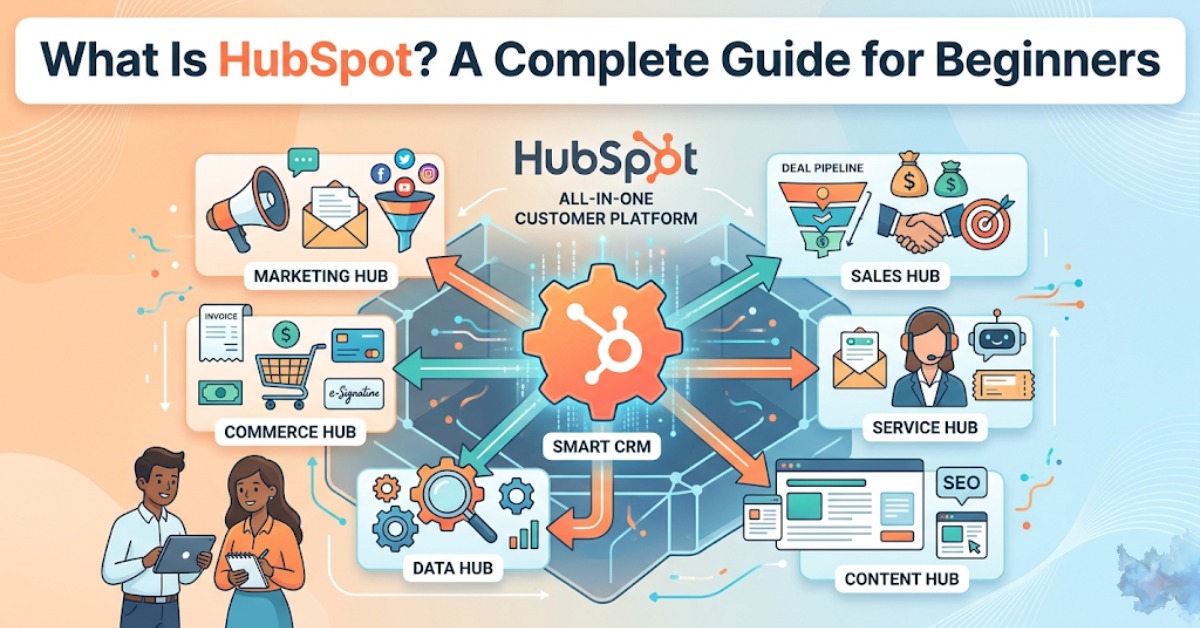
If you’ve been looking into tools to help grow your business online, you’ve almost certainly come across the name HubSpot. Maybe someone on your team mentioned it. Maybe you saw it pop up in a Google search. Either way, you’re here because you want to actually understand what HubSpot is, what it does, and whether it’s worth your time and money.
Good news – by the end of this guide, you’ll know exactly what HubSpot is, how it works, what it’s used for, and whether it makes sense for your business. No jargon, no fluff. Just straight answers.
Let’s get into it.
What Is HubSpot?
HubSpot is an all-in-one software platform that helps businesses manage their marketing, sales, customer service, and operations — all from a single place. Think of it as the command center for your entire customer journey, from the moment someone discovers your brand to the point where they become a loyal, paying customer.
Founded in 2006 by Brian Halligan and Dharmesh Shah at MIT, HubSpot started as a marketing tool built around the idea of “inbound marketing,” the concept that instead of chasing customers, you attract them through helpful content and great experiences. Over the years, it’s grown into a massive customer platform used by more than 200,000 businesses worldwide.
Today, HubSpot is much more than a marketing tool. It includes a full CRM (Customer Relationship Management) system, sales automation, AI-powered features, website-building tools, customer support software, and a lot more.
In the simplest terms: HubSpot helps your business get more customers, close more deals, and keep those customers happy – without needing five different tools to do it.
What Is HubSpot Used For?
This is where things get interesting. HubSpot isn’t a single-purpose tool. Depending on your role and your company’s needs, you might use it very differently from someone else.
Here’s a quick breakdown of the most common use cases:
1. Attracting New Leads
Marketing teams use HubSpot to run blog campaigns, manage social media, run paid ads, and create landing pages — all with built-in SEO tools that help content rank on Google. The platform tells you exactly which pieces of content are driving traffic and conversions, so you’re not guessing.
2. Converting Visitors Into Customers
HubSpot lets you build forms, set up email sequences, create chatbots, and run automated nurture campaigns. When someone fills out a form on your website, HubSpot automatically captures their info, logs it in your CRM, and can even trigger a follow-up email — without you lifting a finger.
3. Managing and Closing Sales
Sales reps love HubSpot because it keeps everything in one place. You can track every email, call, and meeting with a contact. You can set up deal pipelines, get reminders to follow up, and even see when a prospect opens your email. Less time organizing, more time selling.
4. Keeping Customers Happy After the Sale
HubSpot’s service tools let teams manage support tickets, set up knowledge bases, run customer satisfaction surveys, and use AI chatbots to handle common questions — so your support team isn’t buried in repetitive emails.
5. Managing Internal Operations
HubSpot also helps with data syncing across tools, workflow automation, and reporting. Your ops team can build custom dashboards and make sure data is clean and consistent across your entire company.
No matter where you sit in the organization — marketing, sales, service, or ops — HubSpot has something built for you.
Related Blog: Top 10 CRM Software in 2026
What Is HubSpot CRM?
When people ask, “What is a CRM HubSpot?” they’re usually wondering what the CRM piece actually does. Let’s clear that up.
A CRM (Customer Relationship Management) system is a database that stores information about your contacts, leads, and customers — and tracks every interaction you’ve had with them.
HubSpot CRM is the backbone of the entire HubSpot platform. And the best part? It’s completely free to use.
Here’s what HubSpot CRM gives you out of the box:
- A central database of all your contacts and companies
- A visual deal pipeline so you can see where every sale stands
- Email tracking (you’ll know when someone opens your email)
- Meeting scheduling links
- Basic reporting and dashboards
- Integration with Gmail, Outlook, and other tools you already use
Unlike some CRMs that require weeks of setup and an IT team to configure, HubSpot CRM is designed to be easy enough that a non-technical person can have it up and running in an afternoon.
The CRM isn’t just for sales teams either. Marketing uses it to see which leads are engaging with content. Service teams use it to track customer histories. Everyone’s working from the same data, which means fewer miscommunications and dropped balls.
If you’re a small business that currently tracks leads in a spreadsheet, HubSpot CRM is genuinely one of the best free upgrades you can make.
The HubSpot Hubs Explained
HubSpot organizes its tools into what it calls “Hubs.” Each Hub is designed for a specific team or function. You can use just one Hub, a few of them, or the whole platform, depending on what your business needs.
Here’s a plain-English breakdown of each one:
Marketing Hub
This is where marketers live. It handles everything from email marketing and social media scheduling to SEO, ad management, landing pages, and marketing automation. If your goal is to generate more leads and get more eyes on your brand, Marketing Hub is the one you’d start with.
Key features: Email campaigns, blog tools, SEO recommendations, ad tracking, A/B testing, and marketing automation workflows.
Sales Hub
Built for sales teams who want to spend less time on admin and more time closing deals. It includes a pipeline manager, email sequences, call tracking, meeting scheduling, and AI-powered deal intelligence to help reps prioritize the right leads.
Key features: Deal pipelines, email templates and tracking, calling tools, sales automation, and forecasting.
Service Hub
For companies that want to deliver a great customer experience post-sale. You can manage support tickets, build a help center, collect customer feedback (like NPS scores), and use AI chatbots to handle simple questions automatically.
Key features: Ticketing system, live chat, help desk, customer surveys, knowledge base.
Content Hub
This is HubSpot’s enhanced website and content management system. It’s built for companies that want to run their entire website on HubSpot and create personalized, dynamic content for visitors. If you want your website to show different content to returning customers than to new visitors, Content Hub makes that possible.
Key features: CMS, dynamic content, SEO tools, podcast hosting, and AI content tools.
Operations Hub
Think of this as the “behind the scenes” Hub. It’s used by operations and RevOps teams to automate complex workflows, sync data between tools, and keep data clean and consistent across the organization.
Key features: Data sync, programmable automation, data quality tools, and custom reporting.
Commerce Hub
HubSpot’s newest addition is focused on payments, invoicing, and subscriptions. It’s designed for businesses that want to manage the financial side without needing a separate billing platform.
Key features: Payment links, invoices, subscriptions, quotes, revenue reporting.
All of these Hubs connect to the same CRM, which means every team is always looking at the same customer data. No more “which spreadsheet has the latest info?” moments.
What Language Is HubSpot Built In?
This one comes up more often from developers and tech folks who are looking to build on top of HubSpot or just want to understand what’s under the hood.
HubSpot’s back-end infrastructure is built primarily using Java. The platform uses Java for much of its core server-side logic and data processing.
For front-end development and customization, HubSpot has its own templating language called HubL (HubSpot Markup Language), which is conceptually similar to other templating languages like Jinja2. HubL is used to build custom templates, modules, and themes within HubSpot’s CMS.
HubSpot also supports development using standard HTML, CSS, JavaScript, and offers a robust API (Application Programming Interface) that developers can use to integrate HubSpot with virtually any other system.
If you’re a developer looking to customize HubSpot or build integrations, HubSpot’s developer documentation is quite solid and well-maintained, and there’s an active community around it.
What Is a HubSpot Seat?
This is a question that trips up many people when they start exploring HubSpot pricing, so let’s break it down simply.
A HubSpot seat is a license that grants a specific user access to specific paid features within HubSpot.
HubSpot switched to a seat-based pricing model to give businesses more flexibility. Here’s how it works:
- Core seats give users access to the full set of paid features in whichever Hubs your company subscribes to. These are for power users — your marketers, sales reps, and service agents who need full access to do their jobs.
- View-only seats (sometimes called “read-only” seats) allow people to view data and reports without making changes. These are great for executives or stakeholders who need visibility but don’t need to edit anything.
In simple terms, if someone needs to actively use HubSpot in their job, they need a paid seat. If they only need to review reports, they might be able to get by with a free or read-only seat.
Understanding seats is important when budgeting for HubSpot because the cost scales with the number of active users. A company with 5 sales reps will pay less for Sales Hub seats than a company with 50.
Who Should Use HubSpot?
HubSpot isn’t for everyone — and that’s actually fine. Let’s look at who gets the most out of it.
HubSpot is a great fit if you are:
- A small to mid-sized business looking for a single platform to manage marketing, sales, and service
- A growing startup that’s outgrown spreadsheets and basic email tools
- A marketing or sales team that’s tired of switching between a dozen disconnected tools
- A company that does any kind of inbound marketing — blogging, SEO, email campaigns, social media
- A B2B company with a longer sales cycle that needs to track leads carefully over time
HubSpot might not be the best fit if you are:
- A very large enterprise with highly complex custom needs (Salesforce might be a better fit at that scale)
- A solopreneur or freelancer who only needs basic email and contact management (free tools may be enough)
- A business that primarily sells in-store, with almost no digital presence
That said, HubSpot’s free CRM is a strong starting point for just about any business. Many companies start there and grow into the paid Hubs over time as their needs expand.
HubSpot Pricing? How Much Does It Cost?
HubSpot has a free tier and several paid plans. Here’s a simplified breakdown as of 2026:
Free Plan: Includes the basic CRM, contact management, deal pipeline, limited email marketing, live chat, and basic reporting. No credit card required. Genuinely useful for very small businesses just getting started.
Starter Plans: Starting around $15–$20 per seat per month, depending on the Hub. Good for small teams that need a bit more than the free plan — like removing HubSpot branding from emails, getting more email sends per month, and accessing basic automation.
Professional Plans: This is where HubSpot gets really powerful. Pricing typically starts around $800–$900 per month (for Marketing Hub Professional) and includes advanced automation, A/B testing, SEO tools, custom reporting, and much more. This tier is ideal for growing teams that are serious about scaling.
Enterprise Plans: Starting at $3,600+ per month for larger organizations that need advanced features like custom objects, multi-touch revenue attribution, partitioning, and more granular control over user permissions.
One thing to keep in mind: HubSpot pricing can add up quickly as you add Hubs and seats. It’s worth mapping out exactly which Hubs you need and how many seats before committing. HubSpot’s website has a pricing calculator that makes this easier.
HubSpot vs. The Competition
How does HubSpot stack up against other popular tools?
HubSpot vs. Salesforce: Salesforce is the enterprise giant. It’s more customizable at the very top end, but it’s also significantly more complex to set up and manage. HubSpot is much more user-friendly and tends to be a better fit for small to mid-sized businesses. Salesforce usually requires a dedicated admin; HubSpot usually doesn’t.
HubSpot vs. Mailchimp: Mailchimp is primarily an email marketing tool. HubSpot is a full customer platform. If you just need to send email newsletters, Mailchimp might do the job. If you want email + CRM + sales + service all in one, HubSpot is the stronger choice.
HubSpot vs. Zoho CRM: Zoho is a budget-friendly alternative with a wide range of tools. It can do a lot, but many users find the interface less polished and the learning curve steeper. HubSpot tends to win on ease of use and overall product quality.
HubSpot vs. ActiveCampaign: ActiveCampaign is strong at email automation and is often cheaper for smaller lists. But it doesn’t have the built-in CRM depth or the breadth of sales and service tools that HubSpot offers.
The bottom line: HubSpot’s biggest competitive advantage is that it’s genuinely easy to use while still being powerful enough to scale with your business.
Is HubSpot Worth It?
Honest answer? For most growing businesses in the US, yes — HubSpot is worth it. But the value depends heavily on how well you actually use it.
The free CRM is a no-brainer. There’s zero risk to trying it out.
The paid Hubs are where you need to do the math. If HubSpot helps your team close just a few extra deals per month, or saves your marketing team hours of manual work every week, it pays for itself pretty quickly.
Where businesses go wrong is signing up for too much too soon. Start with what you actually need, learn the platform well, and expand as your team grows into it.
HubSpot also invests heavily in education. Their free learning platform, HubSpot Academy, offers certifications on everything from inbound marketing to CRM setup. It’s one of the best free marketing education resources on the internet, and it’s available to anyone regardless of whether you’re a HubSpot customer.
Final Thoughts
So, what is HubSpot? At the end of the day, it’s a platform built to help businesses grow — by bringing marketing, sales, and customer service into one connected system.
Whether you’re just starting out and want a free CRM to organize your contacts, or you’re scaling fast and need enterprise-level automation, HubSpot has a tier for you.
The best way to know if it’s right for your business is to start with the free tools and see how they fit into your workflow. There’s no commitment required, and you’ll know pretty quickly whether it’s the direction you want to go.
Frequently Asked Questions
1. What is HubSpot in simple terms?
HubSpot is an all-in-one software platform that helps businesses attract customers, manage sales, and deliver better support — all from a single dashboard.
2. What is HubSpot used for?
HubSpot is used for email marketing, CRM, sales pipeline management, customer support, website management, and business automation. It’s designed to replace multiple disconnected tools with one unified system.
3. What is HubSpot CRM?
HubSpot CRM is a free customer relationship management tool that stores all your contact and company data, tracks interactions, and connects your marketing, sales, and service teams around a shared source of truth.
4. Is HubSpot free?
Yes, HubSpot offers a free plan that includes basic CRM features, contact management, pipeline tracking, and limited email tools. Paid plans unlock more advanced features and higher usage limits.
5. What is a HubSpot seat?
A HubSpot seat is a user license that gives an individual access to paid features within HubSpot. Core seats are for active users; view-only seats let people see data without editing it.
6. What language is HubSpot built in?
HubSpot’s core back-end is primarily built with Java. Its front-end templating for CMS customization uses HubL (HubSpot Markup Language), and it also supports HTML, CSS, and JavaScript for developer customization.
7. Who is HubSpot best for?
HubSpot is best for small to mid-sized businesses, B2B companies, startups, and marketing/sales teams that want an all-in-one platform that’s easy to use and scales as the business grows.
8. Is HubSpot better than Salesforce?
It depends on your needs. HubSpot is generally easier to use and better suited for small to mid-sized businesses. Salesforce offers more customization for large enterprises but comes with greater complexity and higher cost.



2 Responses