

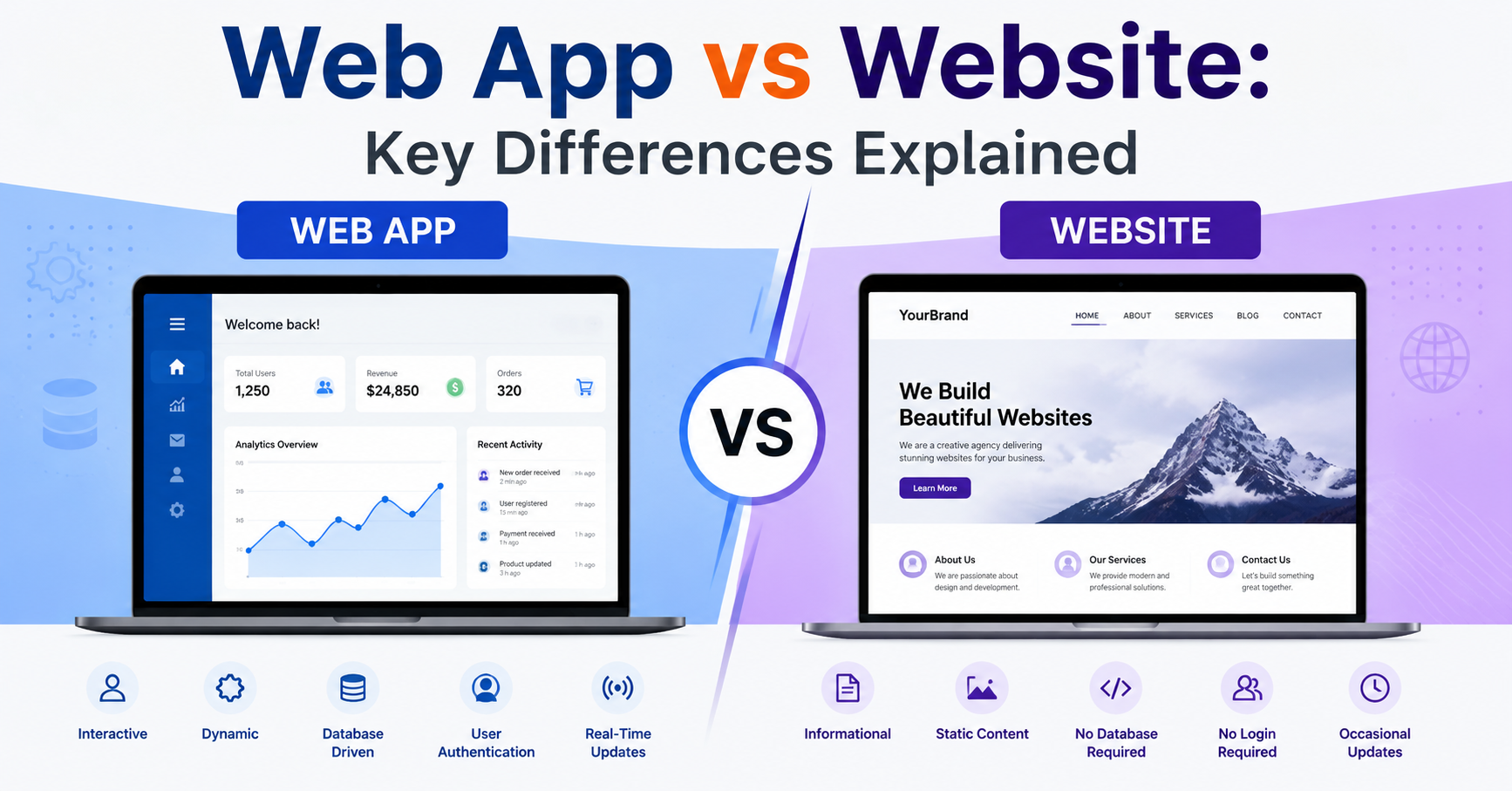
If you’ve ever Googled “web app vs website” and came away more confused than when you started — you’re not alone. This question pops up constantly among developers, startup founders, freelancers, and even people who’ve been building things on the internet for years.
And the honest truth? The line between the two has gotten blurrier over the years. But the distinction still matters — especially when you’re deciding what to build, how much to budget for it, and which tech stack to use.
In this guide, we’re going to break it all down in plain English. No jargon overload. Just a clear, practical walkthrough of what separates a web app from a website, with real examples, a comparison table, and answers to the most common questions people ask.
Let’s get into it.
What Is a Website?
A website is a collection of web pages that live at a specific domain — like techinsightedge.com or nytimes.com. These pages are usually linked together and accessible through a browser.
Think of a website like a brochure or a book. It’s primarily there to deliver information. You open it, you read it, you move on. The content doesn’t change based on who you are or what you do on the page (at least not in the traditional sense).
Common examples of websites:
- A company’s “About Us” page
- A personal blog or portfolio
- A news publication
- A restaurant’s online menu
- A nonprofit organization’s homepage
Most websites are built using HTML, CSS, and sometimes a bit of JavaScript. They can also run on a content management system (CMS) like WordPress, which makes it easier to update content without touching code.
What Is a Web App?
A web app (short for web application) is a software program that runs inside your browser but behaves more like a full-blown application than a simple page of content.
Instead of just reading information, you’re doing something — logging in, submitting data, managing records, making purchases, collaborating with teammates in real time. The web app responds to your actions and gives you personalized results.
Think of it like this: if a website is a newspaper, a web app is more like a word processor you use to write the newspaper.
Common examples of web apps:
- Gmail (email management)
- Trello or Asana (project management)
- Google Docs (document creation and editing)
- Shopify admin dashboard (eCommerce management)
- Online banking portals
- QuickBooks Online (accounting)
Web apps require backend logic, databases, user authentication, and often server-side processing. They’re significantly more complex to build and maintain.
Web App vs Website: The Core Differences
Now let’s get specific. Here are the five main dimensions where websites and web apps differ:
1. Interactivity
This is the most obvious difference.
Websites are mostly passive. You scroll, you read, you click a link to go to another page. Maybe you fill out a contact form. But beyond that, the site doesn’t really change based on what you do.
Web apps are highly interactive. Every action you take — clicking, typing, uploading, submitting — triggers a response. The app processes your input and gives you something back. It’s a two-way conversation, not a one-way broadcast.
Example: A blog where you read posts = website. A platform like Medium where you write, publish, follow other writers, and get personalized recommendations = web app.
2. Functionality
Websites are built to present content. Web apps are built to perform tasks.
A corporate website might tell you what a company does and let you contact their team. A web app built by that same company might let you place an order, track a shipment, manage your account, and submit a support ticket — all within the same interface.
The functionality gap is the clearest indicator of which category something falls into.
3. Technology Used
Here’s where it gets a little more technical.
Websites can be built with:
- Basic HTML and CSS (for static pages)
- JavaScript for minor interactivity
- A CMS like WordPress, Wix, or Squarespace
Web apps typically require:
- Frontend frameworks like React, Vue.js, or Angular
- Backend languages like Node.js, Python, Ruby, PHP, or C#
- APIs (Application Programming Interfaces)
- Databases like MySQL, PostgreSQL, or MongoDB
- User authentication systems
- Often, cloud infrastructure like AWS or Microsoft Azure
The more complex the task the user needs to accomplish, the more complex the underlying tech.
4. Development Complexity
Building a website is generally faster and cheaper. A small business website can be put together in days or weeks using a website builder or a basic WordPress setup.
Building a web app is a much bigger undertaking. It often requires:
- A full development team (frontend, backend, sometimes DevOps)
- Architecture planning
- Security reviews
- API integration
- User testing across browsers and devices
This is a huge factor when deciding which to build — especially if you’re working with a limited budget.
5. Maintenance
Websites are relatively easy to maintain. You update content, maybe install plugin updates, and renew your hosting. That’s about it for most sites.
Web apps require ongoing maintenance — patching bugs, updating dependencies, scaling infrastructure as user volume grows, monitoring for downtime, and continuously testing new features.
If you’re building a web app, budget for maintenance as an ongoing cost — not a one-time thing.
Web App vs Website: Quick Comparison Table
| Feature | Website | Web App |
| Primary Purpose | Deliver information | Enable users to perform tasks |
| Interactivity | Low — mostly read-only | High — input, output, real-time actions |
| Authentication | Usually not required | Often required (login/signup) |
| Technology | HTML, CSS, optional JS/CMS | Frameworks, APIs, databases, backend logic |
| Development Cost | Lower | Higher |
| Build Time | Days to weeks | Weeks to months |
| Maintenance | Minimal | Ongoing |
| Personalization | Generic content for all users | Personalized based on user data |
| Examples | Blog, portfolio, landing page | Gmail, Trello, Shopify dashboard |
Real-World Examples – Web App vs Website
Sometimes an example is worth a thousand definitions. Here are a few side-by-side comparisons to make this crystal clear:
| Example | Website or Web App? | Why? |
| Apple.com product pages | Website | Displays product info; no user-specific interaction |
| Apple’s iCloud.com | Web App | Lets users manage files, photos, and settings |
| A local restaurant’s homepage | Website | Shows menu, hours, location info |
| DoorDash (ordering platform) | Web App | Users log in, order food, track delivery in real time |
| A news publication like CNN.com | Website (mostly) | Primarily static content delivery |
| TurboTax online | Web App | Users enter personal tax data, get calculations, file returns |
| A freelancer’s portfolio site | Website | Showcases work without user interaction |
| Figma (design tool) | Web App | Users create, edit, and collaborate on designs in the browser |
The pattern is pretty clear: if you’re doing something with the tool, it’s a web app. If you’re reading or browsing, it’s a website.
Static Website vs Web App – What’s the Difference?
A static website serves the exact same content to every visitor. The files are pre-built and stored on a server (or a CDN), and there’s no processing happening on the backend when someone visits a page.
Static sites are blazing fast, very secure, and inexpensive to host. Tools like Jekyll, Hugo, Gatsby, or Next.js (in static export mode) are commonly used to build them.
A web app, by contrast, generates content dynamically. What you see when you log into your account is generated specifically for you — based on your preferences, your data, your activity. That requires a backend server and a database working together in real time.
The short version:
- Static website = pre-built pages, same for everyone, no backend needed
- Web app = dynamic content, personalized per user, backend required
This is an important distinction if you’re using a platform like Azure, where there are separate services for hosting static websites and deploying web applications (more on that below).
Progressive Web App vs Website – Is a PWA a Website?
This one trips a lot of people up.
A Progressive Web App (PWA) is essentially a web app that’s been enhanced with modern browser capabilities so it behaves like a native mobile app. It can:
- Work offline (thanks to service workers)
- Be installed to your home screen
- Send push notifications
- Load quickly even on slow connections
A regular website can’t do any of those things without significant extra work.
So is a PWA a website or a web app? Technically, it’s built on web technologies (HTML, CSS, JS) just like a website, but it functions more like a web app — and in some cases, more like a mobile app.
PWA vs Responsive Website:
A responsive website adapts its layout to different screen sizes. That’s it. A PWA goes much further — it adds offline capability, app-like interactions, and installability. You can have a responsive website that is not a PWA, and a PWA that is also responsive.
When to choose a PWA:
- You want a mobile-app-like experience without publishing to the App Store or Google Play
- You need offline functionality
- Your users are on slow or unreliable connections
- You want lower development costs than native apps
Twitter Lite and Starbucks are great real-world PWA examples — both offer a fast, app-like experience directly in the browser.
Mobile Website vs. Mobile Web App: Are They the Same?
No — but they’re easy to confuse.
A mobile website is simply a website that’s been optimized for smaller screens. It adjusts layout, font sizes, and navigation to be usable on a phone. It’s still a website — it just works well on mobile.
A mobile web app is a web application designed specifically for mobile users. It’s interactive, often involves authentication, and may leverage mobile-specific features like the camera, GPS, or touch gestures.
Mobile Website vs Native App:
A native app is downloaded from the App Store or Google Play and installed on the device. It can access hardware features directly and typically runs faster. But it costs more to build and maintain (especially if you need separate iOS and Android versions).
A mobile web app runs in the browser and doesn’t require installation. It’s more accessible (no downloads required) but may have some performance limitations compared to native apps.
Many businesses start with a mobile web app and launch a native app later once they’ve validated the product and grown their user base.
Web App vs Mobile App vs Website – A Three-Way Comparison
| Feature | Website | Web App | Mobile App |
| Runs in | Browser | Browser | Device (installed) |
| Internet Required | Yes | Usually | Not always |
| Installation | None | None | App Store / Play Store |
| Access to Device Hardware | Limited | Limited | Full (camera, GPS, etc.) |
| Development Cost | Low | Medium–High | High |
| Cross-platform | Yes | Yes | Requires separate builds |
| Best For | Information delivery | Task-based tools | Feature-rich experiences |
The right choice depends on your users, your budget, and what the tool actually needs to do. Many successful products use a combination — a marketing website, a web app plus a mobile app.
Web App vs Website in Azure, Visual Studio, and ASP.NET
If you’re a developer, you’ve probably run into this distinction in a technical context. Let’s clear it up.
Azure Static Website vs Static Web App
Microsoft Azure offers two separate services for web hosting:
- Azure Static Website (via Azure Blob Storage) — Hosts purely static files (HTML, CSS, JS). No server-side logic. Very cheap. Great for portfolios, marketing pages, and documentation sites.
- Azure Static Web Apps — A more feature-rich service that supports serverless APIs (via Azure Functions), custom authentication, CI/CD via GitHub Actions, and global distribution via CDN. Despite the name, it’s more suitable for actual web apps, not just static pages.
Key difference: Azure Static Website is simpler and cheaper. Azure Static Web Apps adds backend capabilities through serverless functions — making it suitable for light web application workloads.
Visual Studio: Web App vs Website
In Visual Studio, when you create a new project, you’ll see options for both “Web Site” and “Web Application.” Here’s what separates them:
- Web Site — A loose collection of files; compiled at runtime. Good for rapid prototyping or smaller projects.
- Web Application — A full project with a solution file; compiled before deployment. Better for production applications with proper project structure and team collaboration.
For anything serious going to production, the Web Application project type is the standard choice.
ASP.NET Web App vs Website
The same logic applies in ASP.NET. ASP.NET Web Applications use a compiled model with better tooling support, testing capabilities, and deployment control. They’re the industry standard for production .NET web projects.
If you’re building something on .NET that users will actually interact with, you want an ASP.NET Web App — not a Web Site project.
When Should You Build a Website vs a Web App?
This is the question that really matters. Here’s a practical framework:
Build a Website if:
- Your primary goal is to share information or content
- You don’t need user accounts or logins
- Content changes infrequently
- You have a limited budget
- You need to launch quickly (days/weeks, not months)
- Examples: portfolio, blog, company homepage, landing page, product brochure
Build a Web App if:
- Users need to log in and have personalized experiences
- You’re storing and processing user data
- The tool performs a task (calculations, purchases, collaboration, management)
- You need real-time updates
- You’re building a SaaS product or internal business tool
- Examples: CRM, project management tool, eCommerce platform, booking system
The gray area: Many modern websites have web app features built into them. A company’s main website might be mostly static, but their customer portal is a full web app sitting at app.companyname.com. This hybrid approach is very common.
Speaking of CRMs — if you’re looking for the best tools to manage customer relationships, check out our guide to the Top 10 CRM Software to see which platforms (most of them web apps, by the way) are worth your investment.
Web App vs Website Design Considerations
Design thinking differs between the two.
Website design focuses on:
- Visual hierarchy and aesthetics
- Fast load times (especially for SEO)
- Clear navigation
- Responsive layout for mobile
- Content readability
Web app design (UI/UX) focuses on:
- User flows and task completion
- Error handling and feedback (what happens when something goes wrong?)
- Dashboard layouts and data visualization
- Form design and validation
- Accessibility compliance (WCAG standards)
- State management (what does the app look like when data is loading?)
Web app design is more nuanced because you’re designing for behavior, not just appearance. That’s why web app development typically involves dedicated UX designers alongside developers.
Final Verdict – Which One Do You Need?
Here’s the simplest way to think about it:
If people visit it to learn something → Website.
If people visit it to do something → Web App.
Both are valuable. Both are built with web technologies. But they serve fundamentally different purposes — and understanding that difference will save you time, money, and a whole lot of confusion when you’re planning your next digital project.
If you’re still trying to figure out the right tech stack, tools, or platforms for your project, explore more guides and resources over at TechInsightEdge — we cover everything from development fundamentals to the Top 10 CRM Software platforms that businesses actually use.
Frequently Asked Questions
1. Is Google a website or a web app?
Google.com as a search engine is arguably both — it delivers search results (website behavior) but processes your queries in real time (web app behavior). Google’s other products, like Gmail and Google Docs, are clearly web apps.
2. Is Facebook a website or a web app?
Facebook is a web app. It requires login, personalizes your feed based on your activity, lets you post and interact — that’s web app territory all the way.
3. Can a website become a web app?
Absolutely. Many businesses start with a simple website and gradually add features — user accounts, interactive tools, databases — until it effectively becomes a web app. WordPress sites, for example, can be extended with plugins to handle eCommerce, membership, and other web app-like features.
4. Is a web app better than a website?
Neither is inherently “better.” They serve different purposes. A simple information site doesn’t need web app complexity. A tool that processes user data doesn’t make sense as a static website. The right choice depends entirely on what you need it to do.
5. What is the difference between a web app and a website in terms of SEO?
Websites tend to be easier to SEO because they have static, crawlable content. Web apps can be harder to optimize since content is often loaded dynamically via JavaScript, which search engine crawlers have traditionally struggled with. Server-side rendering (SSR) frameworks like Next.js help bridge this gap for web apps.
6. What’s the difference between a webpage, a website, and a web app?
A webpage is a single page. A website is a collection of webpages under one domain. A web app is a software application accessed through the browser — it may contain many “pages” but functions like an application rather than a content hub.






One Response